{{ s.chev }}
✕
{{ ch.label }}
{{ s.hint }}
System engagement
{{ eo.label }}
Re-engage after{{ s.engHrs }} hrs
Add lead source
{{ ch.label }}
Read time{{ tourReadLabel }}
Dot speed{{ tourSpeedLabel }}
{{ matchedHint }}
Tweaks
Line weight{{ lineOpLabel }}
{{ tc.label }}
Webhook URL
Save always stores the workflow in this browser. With a URL here it also posts the whole configuration to your system.
Reset tweaks
Clear customer data
Accessibility
Text size{{ fontPct }}
Animation speed{{ speedLabel }}
Spoken tour
{{ narrIcon }} {{ narrLabel }}
Voice
Voice speed{{ narrRateLabel }}
Hear it
{{ narrHint }}
{{ n.label }}
{{ n.roleText }}
{{ dc.ch }}
{{ uc.label }}
{{ n.rcText }}
{{ n.chipText }}
kw · {{ n.keyword }}
{{ n.holdGlyph }}
{{ d.tag }}
{{ c.name }} · choose a path
{{ a.name }} · what happened?
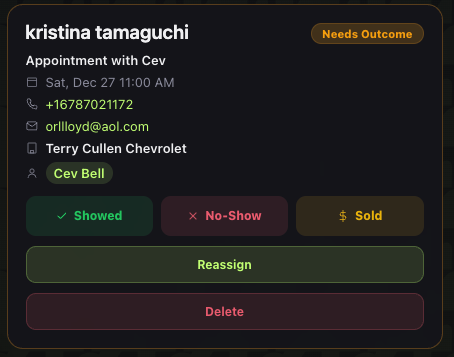
{{ a.name }}
Click Showed, No-Show, or Sold to route the lead
Task Escalation
Escalate after{{ cpEsc }} min
Then notify
{{ ch.label }}
Add managers on the staff slide to populate this list.
How should managers be notified?
{{ tc.label }}
When can the AI send the rep notifications?
Hour band{{ cpHrLabel }}
AM
PM
{{ hm.label }}
On which days?
{{ dy.ch }}
When dealership is open
Inbound Calls
What if the customer calls the AI? Route the call to:
{{ cr.label }}
What if the call is missed?
{{ mo.label }}
New Appt Booked
Who should get notified when a new appointment is booked?
{{ bo.label }}
How should managers be notified?
{{ mc.label }}
When can the AI book appointments?
Hour band{{ cpApHrLabel }}
AM
PM
Store hours
Set hours
{{ cpApDelayTick }}
Same day appointments allowed
On which days?
{{ dy.ch }}
When dealership is open
Unmarked Appt Alert
Alert after{{ cpApptMins }} min
If an appointment isn't marked show, no show, or sold, notify:
{{ ch.label }}
Add managers on the staff slide to populate this list.
{{ crmLabel }}
New Task · Assigned
Before appt
Call {{ leadNameNow }} to confirm the appointment; update the AI assistant with the outcome after the call.
Drive AI · SMS
{{ smsText }}
Delivered · just now
Lead Visibility
What can a rep see when they log in?
Only their own leads
Everyone's leads
Match CRM
Yes
No
AI Initial Message
If a lead asked to be removed, then submits a new lead, may the AI reach out?
Yes, a new lead resets it
No, stay silent
Applies to leads who replied REMOVE or STOP. Silent means the new lead is logged and assigned, but the AI never messages them again.
Google Review Ask
Yes
No
{{ p.txt }}
{{ multiCount }} steps selected
Step settings
✕
Label
Keywords
Comma-separated. A lead whose name contains one is routed through this step.
Size · W {{ sel.w }} × H {{ sel.h }}
Or drag the corner handle on the box.
Color
Owned by
Shape
Active · {{ sel.activeText }}
Always ask · {{ sel.askText }}
Dot stops here for a path choice
Connection
✕
{{ selEdgeDesc }}
Line style
Path
Arch
Or drag the handle on the line itself.
Line color
AI acting
Rep acting
CRM
Staff schedule
✕
↑
Drop in the staff schedule
CSV or pasted text. One person per line, then the days they work.
Any of these read cleanly:
Robert Mai, M T W Th F
Eric Guevara — off Sunday
Jacky Venegas,1,1,1,1,1,0,0
Robert Mai, M T W Th F
Eric Guevara — off Sunday
Jacky Venegas,1,1,1,1,1,0,0
{{ schedSummary }}
{{ sr.name }}
{{ sr.days }}
{{ crmDName }}
Full coverage
Official partner
Live
✕
{{ crmDMissingMsg }}
{{ f.k }}
{{ f.v }}
{{ tp.t }}
What you'll experience
• {{ x.t }}
What DAOS handles
• {{ x.t }}
Good to know: {{ crmDWatch }}
How we get you connected
{{ sp.n }}
{{ sp.t }}
Worth knowing
• {{ x.t }}
CRM configuration
{{ crmNameLabel }}
✕
CRM name
Dealer ID
What this CRM needs
{{ crmReqName }} · edit any line
{{ rq.label }}
{{ crmReqFlag }}
{{ crmReqApplyLabel }}
Not documented yet. Flag this CRM for the build team so the integration path gets confirmed before launch.
DMS & inventory
Automotive
Powersports
The DMS is where the deal is written, the inventory feed is where the vehicles come from. Both are checked against the 2026 integrations list.
{{ df.label }}
{{ df.status }}
{{ dmsFlag }}
Do you have a stop the clock requirement from the manufacturer?
Some OEM programs measure response time inside the CRM, so the first reply has to be logged there to stop the clock.
Yes
No
Do you take subprime leads?
If you do, we decide together what DAOS works: every internet lead, or every internet lead plus the subprime traffic.
No subprime leads
Yes · DAOS works all internet leads
Yes · internet + subprime
What to switch off in the CRM
Turn off the CRM's SMS and email templates so the customer is not getting two sets of messages. Leave the phone call follow ups on: those are the rep's tasks, and Drive AI does not make calls.
{{ crmSmsTick }}
SMS templates turned off
{{ crmEmailTick }}
Email templates turned off
{{ crmCallTick }}
Phone call follow ups left on
Store identity
AI assistant name
A2P texting number
Store address
Notes for the build team
{{ zoomPct }}
{{ bannerIcon }}
{{ bannerText }}
Task {{ tt.n }}
{{ tt.status }}
{{ tt.text }}
Click to open the rep's view →
{{ tt.note }}
Appointment task
Call {{ cc.name }} to confirm the appointment before it is marked.
Confirmation call made
{{ demoHeader }}
−
{{ demoZPct }}
+
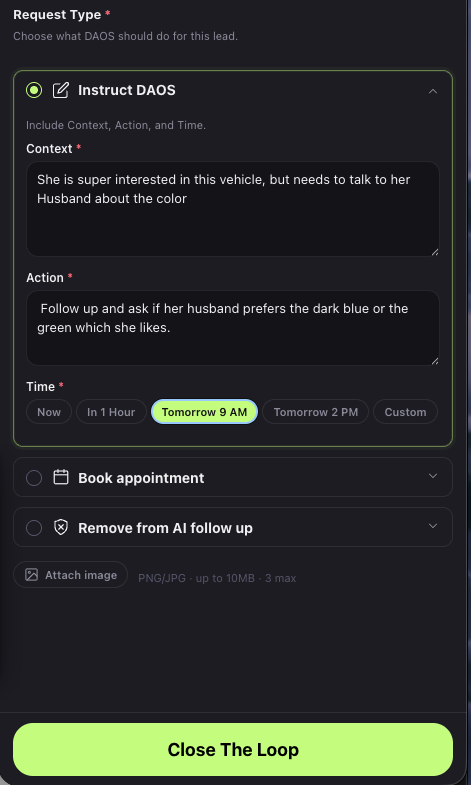
{{ demoTypeCtx }}{{ demoCaretCtx }}
{{ demoTypeAct }}{{ demoCaretAct }}
👆 click
1 · CONTEXT
Context. The rep types what actually happened on the call. In this example: "She is super interested in this vehicle, but needs to talk to her husband about the color." Click to advance →
2 · ACTION
Action. What the AI should do next, in plain English: "Follow up and ask if her husband prefers the dark blue or the green which she likes." Click to advance →
3 · TIMING
Time. One tap picks the moment: Now, In 1 Hour, Tomorrow 9 AM, Tomorrow 2 PM, or Custom. The AI handles every message from there. Click to advance →
4 · CLICK
Click Close The Loop on the widget. About ten seconds of the rep's time, and the AI picks the conversation straight back up.
{{ actKicker }}
{{ actTitle }}
{{ actSub }}
Click to advance
Lead assignment
Who gets the lead, and when
Every lead that reaches the store lands somewhere. This board is the rule you set for that. Send one through and watch where it goes.
Lead sources, on the left
One box per channel that feeds you: website, phone, walk-in, marketplace. Leads start there.
Two ways to run assignment
Preferred: the store sets up a round robin in their CRM and DAOS mirrors it, so both systems always agree on who owns the lead. No CRM round robin? DAOS runs one itself and deals leads out evenly. Bucketed CRM systems should switch to a round robin in the CRM.
Your floor, one circle each
Name, role, and the day picker. A rep only receives leads on the days they actually work, so nothing sits with someone who is off.
The count on a circle
How many leads that person has taken in this run. It is the fastest way to see whether the split is fair.
Send Lead and Cascade 100
Send Lead pushes one named lead through. Cascade 100 fires a hundred so you can watch the pattern hold up over a real day.
Staff schedule and CRM
Load the real schedule so the days match your store, and point DAOS at the CRM it should write back to.
No lead left behind. Not on a day off, not on a busy Saturday.
Got it
⠿ Auto tour
{{ tourStage }}
✎ Edit
{{ tourText }}
⚠ {{ missLabel }}
{{ missText }}
{{ toastMsg }}
Their customizations
{{ custBadge }}
{{ custChev }}
{{ sec.label }}
{{ sec.prog }}
{{ sec.chev }}
{{ r.k }}
{{ r.v }}
↗
{{ r.ledBtn }}
{{ p.label }}
{{ ch.label }}
Value{{ r.slLabel }}
{{ dy.ch }}
Hour band{{ r.bandLabel }}
Routes to
{{ ch.label }}
If they leave without buying
{{ p.label }}
Re-engage after{{ r.engHrsLabel }}
First message
{{ p.label }}
Call script
{{ ppCount }}
×
← Back
Next →
{{ ppCtxLabel }}
{{ ppTitle }}
{{ ppCue }}
{{ ln.x }}
{{ op.label }}
Step title
Presenter cue
Lines (blank line between them)
Save
Cancel
Reset to original
Aa
Aa
Script
← Slide 3
The Workflow
Continue · Slide 4 →
Configuration summary
Downloaded to your machine. This is what the customer sees.
Print / Save as PDF
×